Monday, November 23, 2015

IBM is set to challenge Intel's Xeon by IBM Power8


Five years. That is how much time has passed since we have seen an affordable server processor that could keep up with or even beat Intel's best Xeons. These days no less than 95% of the server CPUs shipped are Intel Xeons. A few years ago, it looked like ARM servers were going to shake up the market this year, but to cut a long story short, it looks like the IBM POWER8 chip is probably the only viable alternative for the time being.

That was also noticeable in our Xeon E7 review, which was much more popular than we ever hoped. One of the reasons was the inclusion of a few IBM POWER8 benchmarks. We admit that the article was however incomplete: the POWER8 development machine we tested was a virtual machine with only 1 core, 8 threads and 2 GB of RAM, which is not enough to do any thorough server testing.

After seeing the reader interest in POWER8 in that previous article, we decided to investigate the matter further. To that end we met with Franz Bourlet, an enthusiastic technical sales engineer at IBM and he made sure we got access to an IBM S822L server. Thanks to Franz and the good people of Arrow Enterprise Computing Solutions, Arrow was able to lend us an IBM S822L server for our testing.
A Real Alternative?

Some of you may argue that the POWER based servers have been around for years now. But the slide below illustrates what we typically associated IBM's POWER range with:


Proudly, the IBM sales team states that you can save 1.5 million dollars after you have paid them 2 million dollars for your high-end 780 system. There is definitely a market for such hugely expensive and robust server systems as high end RISC machines are good for about 50,000 clients. But frankly for most of us, those systems are nothing more than an expensive curiosity.

Availability can be handled by software and most of us are looking/forced to reduce our capital expenses rather than increase them. We want fast, "reliable enough" servers at low costs that are easy to service. And that is exactly the reason why the single and dual sockets Xeon servers have been so popular the past decade. Can an IBM POWER server be a real alternative to the typical Xeon E5 server? The short but vague answer: a lot has changed in the past years and months. So yes, maybe.

Thursday, April 16, 2015

Intel Readying l5-core XEON E7 v2


Reports from ISSCC are coming out that Intel is preparing to launch a 15-core Xeon CPU.  The 15-core model was postulated before Ivy Bridge-E launch, along with 12-core and 10-core models – the latter two are currently on the market but Intel was rather silent on the 15-core SKU, presumably because it harder to manufacturer one with the right voltage characteristics.  Releasing a 15-core SKU is a little odd, and one would assume is most likely a 16-core model with one of the cores disabled – based on Intel’s history I doubt this core will be able to be re-enabled should the silicon still work. I just received the official documents and the 15 core SKU is natively 15-core.
Information from the original source on the top end CPU is as follows:
  •  4.31 billion transistors
  •  Will be in the Xeon E7 line-up, suited for 4P/8P systems (8 * 15 * 2 = 240 threads potential)
  •  2.8 GHz Turbo Frequency (though the design will scale to 3.8 GHz)
  •  150W TDP
  •  40 PCIe lanes
Judging by the available information, it would seem that Intel are preparing a stack of ‘Ivytown’ processors along this design, and thus a range of Xeon E7 processors, from 1.4 GHz to 3.8 GHz, drawing between 40W and 150W, similar to the Xeon E5 v2 range.
Predictions have Ivytown to be announced next week, with these details being part of the ISSCC conference talks.  In comparison to some of the other Xeon CPUs available, as well as the last generation:


Intel Xeon Comparison 


According to CPU-World, there are 8 members of the Xeon E7-8xxx v2 range planned, from 6 to 15 cores and 105W to 155W, along with some E7-4xxx v2 also featuring 15 core models, with 2.8 GHz being the top 15-core model speed at 155W.
All this is tentative until Intel makes a formal announcement, but there is clearly room at the high end.  The tradeoff is always between core density and frequency, with the higher frequency models having lower core counts in order to offset power usage.  If we get more information from ISSCC we will let you know.
Original Source: PCWorld
Update: Now I have time to study the document supplied by Intel for ISSCC, we can confirm the 15-core model with 37.5 MB L3 cache, using 22nm Hi-K metal-gate tri-gate 22nm CMOS with 9 metal layers.  All the Ivytown processors will be harvested from a single die:


Ivytown Die Shot

The design itself is capable of 40W to 150W, with 1.4 GHz to 3.8 GHz speeds capable.  The L3 cache has 15x 2.5MB slices, and data arrays use 0.108µm2 cells with in-line double-error-correction and triple-error-detection (DECTED) with variable latency.  The CPU uses three clock domains as well as five voltage domains:


Level shifters are placed between the voltage domains, and the design uses lower-leakage transistors in non-timing-critical paths, acheving 63% use in the cors and 90% in non-core area.  Overall, leakage is ~22% of the total power.
The CPUs are indeed LGA2011 (the shift from Westmere-EX, skipping over Sandy Bridge, should make it seem more plausible), and come in a 52.5x51.0mm package with four DDR3 channels.  That would make the package 2677 mm2, similar to known Ivy Bridge-E Xeon CPUs.
CPU-World's list of Xeon E7 v2 processors come from, inter alia, this non-Intel document, listing the 105W+ models.


Tuesday, April 14, 2015

Intel’s erratic Core M performance leaves an opening for AMD

When Intel announced its 14nm Core M processor it declared that this would be the chip that eliminated consumer perceptions of an x86 “tax” once and for all.* Broadwell, it was said, would bring big-core x86 performance down to the same fanless, thin-and-light form factors that Android tablets used, while simultaneously offering performance no Android tablet could match. It was puzzling, then, to observe that some of the first Core M-equipped laptops, including Lenovo’s Yoga 3 Pro, didn’t review well and were dinged for being pokey to downright sluggish in some cases.


A new report from Anandtech delves into why this is, and comes away with some sobering conclusions. Ever since Intel built Turbo Mode into its processors, enthusiasts have known that “Turbo” speeds were best-case estimates, not guarantees. If you think about it, the entire concept of Turbo Mode was a brilliant marketing move. Instead of absolutely guaranteeing that a chip will reach a certain speed at a given temperature or power consumption level, simply establish that frequency range as a “maybe” and push the issue off on OEMs or enthusiasts to deal with. It helped a great deal that Intel set its initial clocks quite conservatively. Everyone got used to Turbo Mode effectively functioning as the top-end frequency, with the understanding that frequency stair-stepped down somewhat as the number of threads increased.

Despite these qualifying factors, users have generally been able to expect that a CPU in a Dell laptop will perform identically to that same CPU in an HP laptop. These assumptions aren’t trivial — they’re actually critical to reviewing hardware and to buying it.

The Core M offered OEMs more flexibility in building laptops than ever before, including the ability to detect the skin temperature of the SoC and adjust performance accordingly. But those tradeoffs have created distinctly different performance profiles for devices that should be nearly identical to one another. In many tests, the Intel Core M 5Y10 — a chip with an 800MHz base frequency and a 2GHz top clock — is faster than a Core M 5Y71 with a base frequency of 1.2GHz and a max turbo frequency of 2.9GHz. In several cases, the gaps in both CPU and GPU workloads are quite significant — and favor the slower processor.

Tuesday, April 7, 2015

Intel Compute Stick available for pre-order, available in Linux and Windows


The Intel Compute Stick is ready for the masses starting later this April.
Intel introduced the Compute Stick several months back at CES with little to zero buzz to go along with it.  That’s not to say that there’s nothing to look forward to as far as viability goes.  The reasonably priced PC on a stick comes with decent specs depending on the model and configuration.

Newegg has the device up for pre-order for $150, which comes with Windows 8.1, 2GB of RAM, 32GB SDD storage, and a quad-core Atom chip.  The Linux version comes with the same specs if you get it from Newegg, but elsewhere you’ll have to settle for 1GB of RAM and 8GB of internal storage.

A few Chinese manufacturers have already launched their own Intel-based PC sticks, and they’re a bit cheaper if you know where to look (read: eBay).
So while there are PC sticks featuring ARM-based chips flooding the marketplace, there is an advantage to using an x86-based chip over ARM.  People that remain reliant on software designed for x86 can rely on the Compute Stick for just that, and a $100-150 Intel stick isn’t at all a bad deal.  Take into account that fact that it comes with Windows 8.1 and a free upgrade to Windows 10, and you’ve gotten yourself a nice little bargain.

Of course people won’t be using the Compute Stick for resource intensive tasks, but for every day productivity it’s better than lugging around and setting up a tower (or even something like the NUC).

Source: Newegg/Amazon

Thursday, April 2, 2015

Intel SSD 750 Series 1.2TB PCIe NVMe Review

The push for greater performance from storage devices is seeing enthusiast drives transition towards PCIe-linked connections for increased bandwidth. While faster hardware is great, on paper, it is of limited use if the surrounding ecosystem is unable to put the performance increases to effective use.
That’s where the SSD-optimised Non-Volatile Memory Express (NVMe) specification comes into the picture. Today we will be looking at one of the first storage devices to make NVMe accessible for enthusiast consumers – Intel’s SSD 750 Series PCIe drive.


In the SSD 750 Series drive, Intel is aiming to give enthusiast consumers an SSD that is built for raw performance. There’s no compromising when it comes to form factor, size, or power consumption – drive performance is the ultimate objective, with special emphasis on random operations. The big benefit that NVMe brings to the 750 Series SSD is lower latency, thanks to a combination of CPU-attached PCIe lanes and the specification’s different CPU overhead.
Shipping in capacities of 400GB ($389) and 1.2TB ($1029), Intel is using a standard PCIe 3.0 x4 connector to feed the half-height, half-length (HHHL) add-in card version, while the 2.5″ (15mm-thick) alternative receives its four PCIe 3.0 lanes via the SFF-8639 connector. We actually saw an implication of more widespread consumer support for the SFF-8639 connector when we reviewed Asus’ NVMe-supporting TUF Sabertooth X99 motherboard.
With head-turning performance numbers being thrown around, such as 2,400/1,200 MBps sequential read/write and 440,000/290,000 4K random read/write IOPS, let’s take a closer look at Intel’s SSD 750 Series drive and head on into testing.
Specification:
  • Capacities: 400GB, 1.2TB.
  • Interface: PCIe 3.0 x4 (NVMe).
  • Form Factors: 2.5-inch with SFF-8639 connector, HHHL PCIe x4 Add-In Card (AIC).
  • Memory Components: Intel 20nm MLC NAND.
  • Sequential Read/Write Speeds (up to): 2,200/900 MBps (400GB), 2,400/1,200 MBps (1.2TB).
  • 4K Random Read/Write (up to): 430,000/230,000 IOPS (400GB), 440,000/290,000 IOPS (1.2TB).
  • Latency Read/Write (typical): 20/20 μs (400GB), 120/30 μs (1.2TB).
  • MTBF: 1.2 million hours.
  • Endurance Rating: 70GB Writes Per Day, Up To 219TBW (Terabytes Written).
  • Warranty: 5 Years
  • Power Consumption (Idle): 4W (400GB), 4W (1.2TB).
  • Power Consumption (Active) Read/Write: 9/12 W (400GB), 10/25 W (1.2TB).
  • Weight (up to): 195g (AIC), 125g (2.5″).
  • Operating Temperature: 0-55°C (AIC), 0-70°C (2.5″).

Tuesday, March 31, 2015

Intel releases four new Braswell CPUs


The new Braswell architecture CPUs bring greater CPU and Graphics performance over the previous generation entry-level CPUs from Intel while offering lower consumption and lower TDP. The four new CPUs unveiled by Intel include the Celeron N3000, N3050, N3150, and the Pentium N3700. All four are 14nm chips and feature Airmont processing cores.

The Celeron N3000 is a dual-core processor with a base frequency of 1.04GHz and Turbo Boost speed of 2.08GHz. It comes with 1MB L2 cache, Gen 8-LP graphics, DDR3-1600 memory support and a 4W TDP. Next up is the Celeron N3050. It too is a dual-core chip but features a higher clock speed of 1.6GHz and Turbo Boost up to 2.16GHz. The rest of the specs are similar, except for a slightly higher 6W TDP rating.

The Celeron N3150 and the Pentium N3700 are quad-core chips with 2MB L2 cache and 6W TDP rating. Both feature the same base frequency of 1.6GHz but offer different Turbo Boost speeds. The Celeron N3150 has a Turbo Boost frequency of 2.08GHz while the Pentium N3700 offers a higher 2.4GHz Turbo Boost clock.
Source: CPUWorld


Brace yourselves, Tegra X1 Chromebooks could be imminent

A logical continuation of a so far fruitful Google – Nvidia alliance.


Attack and counterattack. It’s probably the best way to describe what’s going down in the PC landscape between market veteran Microsoft and a certain up-and-coming player in this niche that enjoys a comfortable dominance over the web search décor.
While Chromebooks are likely light-years away from actually contending with mainstream Windows laptop sales, their recent education strides haven’t left Redmond feeling too secure of its supremacy. Ergo, both combatants reportedly have $149 portable computers for emerging countries in the pipeline.
Looking to take the fight to the next level, Chrome OS machines are starting to slowly but steadily improve their upper mid-range and high-end relevance. In the past month alone, a second-gen Google Chromebook Pixel and 15-inch Acer with full-on Intel Broadwell horsepower have gone official. And now rumor is the Tegra X1 chip will soon find its way inside above-average web-centric notebooks.

It goes without saying Nvidia’s Tegra K1 sequel doesn’t exactly play in the same league as fourth-gen Intel Cores. But neither do Celerons compared to the X1. Built on Maxwell microarchitecture, the platform we saw acing AnTuTu tests not long ago rocks four muscular Cortex-A57 cores and a quartet of more frugal A53s. Not to mention the outstanding 256-core (!) GPU accompanying the speedy CPU.
Remember, the much laggier K1 was almost unanimously praised for the work it did under the hoods of 13-inch Acer and 14-inch HP Chromebooks, currently available at sensible $220 and $270 starting prices. So, in addition to Celeron-eclipsing potency, X1s could help deliver decent quality-cost ratios.
Before you begin jubilating at Microsoft’s expense, Chrome OS enthusiasts tuning in should keep in mind all the above is speculation at the moment. Essentially, it appears development work is underway to ensure support on the platform, which may mean Tegra X1 Chromebooks will materialize at some point… or not.
Sources: Liliputing, CNX-Software

MediaTek’s Helio SoCs aim for the high-end smartphone market


MediaTek today announced its new Helio family of high-end SoCs that aim to deliver leading performance with frugal power consumption. While MediaTek enjoys a relatively decent market share in the low and mid-range smartphone SoC segment, the company has so far struggled to match up to Qualcomm and Samsung’s best in the high-end segment. The company is hoping to change this with the new Helio SoCs. The new range comprises of the Helio X and the Helio P chipsets. The Helio X10 will be a 64-bit chipset with a total of eight processing cores clocked at 2.2GHz. This chipset will be capable of handling display refresh rates up to 120Hz and can encode 480p slow-motion videos. MediaTek did not reveal any details on the Helio P series chipset though. The Helio P is said to be the company’s premium performance chip and is aimed at flagship Android smartphones. The company did mention though that it expects first products powered by Helio chips to be available by the second quarter of the year. Helio P powered devices will arrive later in the year. Source: DigiTimes

Sunday, August 18, 2013

Elon Musk details Hyperloop: public transit via aluminum pods and electric motors

Elon Musk is into transportation, whether it's an electric car or a spaceship. Today, he detailed a plan to revolutionize a portion of public transit. It's called the Hyperloop, and it's meant to get folks from SF to LA (or any two cities less than 900 miles apart) in 30 minutes seated in aluminum pods that are hurtled to and fro at 800 miles an hour in a pair of steel tubes. To keep things safe, pods will be spaced five miles apart so that they can stop without running into each other, which means a total of 70 pods could operate simultaneously.
Of course, the real question is how to get the pods moving at those speeds? One main issue with such transport is wind resistance (and associated friction) that increases as the speed of the pods inside the tube escalate. Naturally, one could operate the tubes in a complete vacuum to eliminate the problem, but keeping such a system free of air would be difficult over such long distances. Instead, the proposed Hyperloop system works as a low air pressure environment that is easily maintained with standard commercial compressors. Additionally, "an electric compressor fan on the nose of the pod that actively transfers high pressure air from the front to the rear of the vessel" is there to relieve what air does build up at the front. This compressor fan would also generate an air bearing around the pod to keep it suspended in the middle of the tube, much as an air hockey table suspends a plastic puck. As for power? Well, that comes from external linear electric motors positioned every 70 miles to keep the pods humming along at subsonic speeds. 


Musk's Hyperloop plans don't stop there, either. His proposal accounts for potential pitfalls with building the necessary tubes and powering the system. As for the first issue, the California Hyperloop could be built on top of pylons and run parallel to an existing interstate linking LA and SF to minimize environmental impact and the need to acquire land for the project. Pylon construction also provides the added benefit of being better able to withstand the forces of an earthquake than a terrestrial train can. As for concerns about power, Musk proposes covering the tubes in solar cells so that the system actually generates more electricity than it consumes.
All told, Elon estimates the cost of constructing Hyperloop to be around $6 billion, but the plan is far from set in stone. He's already said that an updated version of the project is in the works and he's offered up his plans as an open design, so he's open to suggestions and improvements from others. And, to prove that his plan can actually work, Musk may build a functional demonstration prototype. Should be easy, Elon. It's not like you have anything else to do, right?

Thursday, August 1, 2013

Volvo, Has the solution for recharging electric cars


Electric vehicles, despite being a reality today , many problems still have to be able to expand its use worldwide. Different solutions have been devised in recent years to facilitate recharging of batteries for these cars, but almost all involve a visit to a specialist station.Volvo thought differently.
The project called “Pure Tension” designed by the firm Synthesis Design + Architecture to recharge the Volvo V60 resulted in the creation of a folding structure with solar cells that can be easily transported in the trunk of the vehicle, which will produce energy virtually anywhere.
The idea with this project is that drivers can have a profitable way to recharge the battery of your vehicle. With Pure Tension would eliminate operating costs to replace a discharged battery to power the other to the top , as well as connecting the car to a charging station or directly to the household outlet.

Unfortunately, we still project Volvo has several disadvantages. First, the structure is 3 meters high and 7 meters in width and depth when deployed also takes 12 hours to fully recharge the battery of the Volvo V60 if weather conditions are ideal.
Volvo plans to Pure Tension show later this year as a prototype, but a version that is ready to market is still remote.
However, this development is likely to reach a point where Pure Tension can be more efficient to recharge the batteries and have a size that requires less installation space, with the aim of making the use of hybrid and electric cars much simpler and economic development.

Tuesday, February 12, 2013

Coming Soon To The Coolest Classrooms: A Box Full Of Robots


Learning algebra with a robot sounds way better than learning it with flashcards, right? I know I would have had a better time learning quadratic equations if I was using them to do something actually interesting, like figure out a quadcopter’s viewing area. That’s the goal of this new robot-filled box made by a company called RobotsLab.
The Box--that’s its name--comes with four robots, many of which are familiar: The fun AR.drone, the Sphero robot ball, a Mobot two-wheeler, and a robotic arm. You also get a teacher tablet full of apps and videos that contain the lessons, a teacher’s book, quizzes and printable student assignments.
To answer the questions, students will have to solve equations, understand scientific forces and think like an investigator. In other words, they have to learn math and science.
It’s a cool concept for a better science, technology, engineering and math curriculum. The only catch seems to be that robots aren't cheap: The Box will set a teacher back $3,500. As IEEE points out, you can buy the 'bots and a tablet off the shelf for about $2,000. The included lessons are obviously of value, but it would be up to a teacher to decide just how valuable. It launches this week at the Texas Computer Education Association conference.

Tuesday, September 18, 2012

X - The Ten Instruments Mars Rover Curiosity Carries : Dynamic Albedo of Neutrons


Dynamic Albedo of Neutrons

NASA/JPL-Caltech


Even if Curiosity doesn't, say, run into a puddle, there are still ways for it to discover water on Mars. Cosmic rays constantly hit the planet's surface, knocking neutrons out of orbit. Hydrogen atoms in water or ice will slow those neutrons down, and that can be detected.
A pulsing neutron generator called the Dynamic Albedo of Neutrons (DAN) can detect water content as small as one-tenth of 1 percent. DAN will send a beam of neutrons into the surface, three to six feet into the ground; if it detects a large amount of slower neutrons, that's decent evidence there's water underneath.

Click to see more

Friday, August 17, 2012

IX - The Ten Instruments Mars Rover Curiosity Carries : The Sample Analysis at Mars Instrument


The Sample Analysis at Mars Instrument

NASA/JPL-Caltech/Goddard Space Flight Center


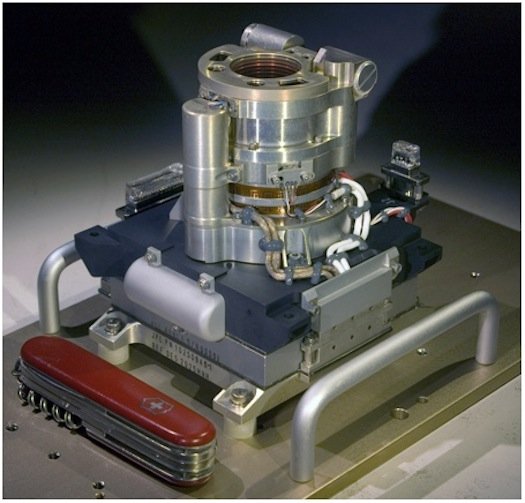
The Sample Analysis at Mars (SAM) instrument is the technology behemoth of the Mars Rover Curiosity mission. A suite of three instruments, it makes up more than half of the scientific payload of Curiosity, and focuses on striking gold by finding evidence of life on Mars. The mass spectrometer, gas chromatograph, and tunable laser spectrometer inside can find compounds of carbon, such as methane, while also searching for lighter elements that might also indicate life, like hydrogen, oxygen, and nitrogen.
The mass spectrometer will separate elements by mass, the gas chromatograph will vaporize samples using heat to analyze them, and the laser spectrometer will measure how much of various isotopes are in the samples. Accurate to within 10 parts per thousand, it may be the best chance Curiosity has of discovering life--past or present.

Thursday, August 16, 2012

VIII - The Ten Instruments Mars Rover Curiosity Carries : Chemistry and Mineralogy X-Ray Diffraction Instrument


Chemistry and Mineralogy X-Ray Diffraction Instrument

NASA/JPL-Caltech


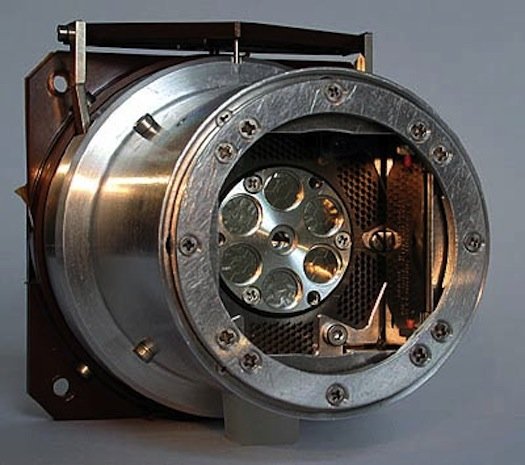
Mars Rover Curiosity's mission isn't just one that represents the future of space tech; it's also about uncovering the history of Mars. Minerals can be a strong indication of what the planet looked like as it was forming. Certain minerals, for example, may indicate that lava once flowed near a certain area. The chemistry and Mineralogy X-Ray Diffraction Instrument (CheMin) will be able to find and analyze those and a whole lot more.
Curiosity will be able to drill into rocks and collect a powder, then store it internally. CheMin will shoot tiny X-rays at the rock or soil sample; when they interact with it, some are absorbed and re-emitted at different energies. By calculating those energies, CheMin will be able to determine the atoms present in the sample.
What minerals they discover might also hint at how much of a role water played in forming the planet's minerals. Certain minerals contain water, and CheMin can tell the difference between those and the waterless variety. It might even clue scientists in on if Mars could have once supported life.

Wednesday, August 15, 2012

VII - The Ten Instruments Mars Rover Curiosity Carries : Alpha Particle X-Ray Spectrometer


Alpha Particle X-Ray Spectrometer

NASA/JPL-Caltech/Cornell/Max Planck Institut für Chemie/University of Guelph


To get an accurate analysis of samples on Mars, the Alpha Particle X-Ray Spectrometer (APXS) works up close. When it makes contact with a rock or soil sample, it'll bombard it with alpha particles and X-rays emitted as the element curium, placed inside, decays. The rays knock electrons from the sample out of orbit, and the energy released can be measured by sensors. This much energy, you've got sodium. Count again, and you've got something else.
It works day and night, but can take a little while to get a thorough analysis: as long as two to three hours to determine all of the elements that a sample contains, although 10 minutes is enough to see the major elements at a glance.

Monday, August 13, 2012

VI - The Ten Instruments Mars Rover Curiosity Carries : The Rover Environmental Monitoring Station


The Rover Environmental Monitoring Station

NASA/JPL-Caltech


In addition to being a great geologist, The Rover Environmental Monitoring Station (REMS) will make Mars Rover Curiosity into a great cosmic meteorologist. In daily and seasonal reports, REMS will send scientists information on atmospheric pressure, humidity, UV radiation, wind speed and direction, air temperature, and ground temperature.
Two booms will monitor wind speed, helping us to understand how breezes and one of the biggest weather phenomena on Mars, dust, operate. An inner sensor exposed to the atmosphere will catalogue changes in pressure caused by changes in the weather, and a filter keeps all the unwanted dust out.

Sunday, August 12, 2012

V - The Ten Instruments Mars Rover Curiosity Carries : Mars Hand Lens Imager


Mars Hand Lens Imager

NASA/JPL


Sometimes, the tech of mere mortals can stand up to an uber geologist like Curiosity. The hand lens, for example, is an important, commonly used geological tool. And the Mars rover will be carrying its own robotic version on board.
The Mars Hand Lens Imager (MAHLI) will help give an extremely close view of samples to scientists back at home. Extremely close: MAHLI will be able to take color images as small as 12.5 micrometers (less than human hair size). A traditionally white, flashlight-type light source and an ultraviolet, black light source will allow it to work day and night. The UV light also has an ulterior function: it can light up samples to detect carbonate and evaporite minerals, which would be evidence that water helped form Mars.

IV - The Ten Instruments Mars Rover Curiosity Carries: ChemCam


ChemCam

NASA/JPL-Caltech/LANL


Maybe the most futuristic of Curiosity's tools, the ChemCam is an analyzing laser. By pointing it at areas as small as 1 millimeter, Curiosity will be able to determine the elemental composition of vaporized materials. A spectrograph will monitor the plasma created from zapping rocks and soil, then analyze its geological structure.
It can be used in another handy way, too: the laser can clear away dust, allowing for much more detailed photographs, and if Curiosity can't get close enough to take a closer look at a piece of Mars, ChemCham can do it from 23 feet away. From that distance, it's still able to learn the type of rock in a sample, the composition of soil, if a sample contains chemicals harmful to humans, and if it contains water or ice.

Saturday, August 11, 2012

III - The Ten Instruments Mars Rover Curiosity Carries: MEDLI


MEDLI

Lockheed Martin


Engineers have a lot to worry about during Curiosity's descent through the atmosphere--as advertised by their "seven minutes of terror" video. But during that descent, Curiosity will already be working, gathering data for the next set of missions to Mars.
The MSL Entry, Descent and Landing Instrumentation (MEDLI) will monitor the heat and pressure it undergoes upon entry. It's actually made up of two kinds of instruments: MISP (MEDLI Integrated Sensor Plugs) and MEADS (Mars Entry Atmospheric Data System). Seven of each type sit on Curiosity's heat shield. (The system is the black box in the left of the photo.)
MISP will measure just how hot things get when it's burning through the atmosphere. (Short answer: really hot. Slightly less short answer: three times hotter than a space shuttle going through Earth's atmosphere.) Curiosity's thermal protection system will actually burn off, and MISP will measure the rate of burning, known as "recession."
MEADS will take a measurement of the atmospheric pressure during descent. Arranged in a cross pattern, the seven sensors will allow engineers to determine Curiosity's orientation as a function of time. Once they know that, they can grade Curiosity's descent against their predictions, then improve them for next time.